Website Publication Files
ad pub
How I create web pages from selected files from this repository, with private and public editions.
Quickstart
Prerequisites: install node and git; clone the source with git clone https://git.surfacemarkup.net/hans/ad_pubfiles.
In this repository,
npm installdependencies, including Web Origami. The following instructions assume you also have installed theoricommand withnpm install -g @weborigami/origami. If not, replaceoriin commands below withnpx @weborigami/origami.link or copy
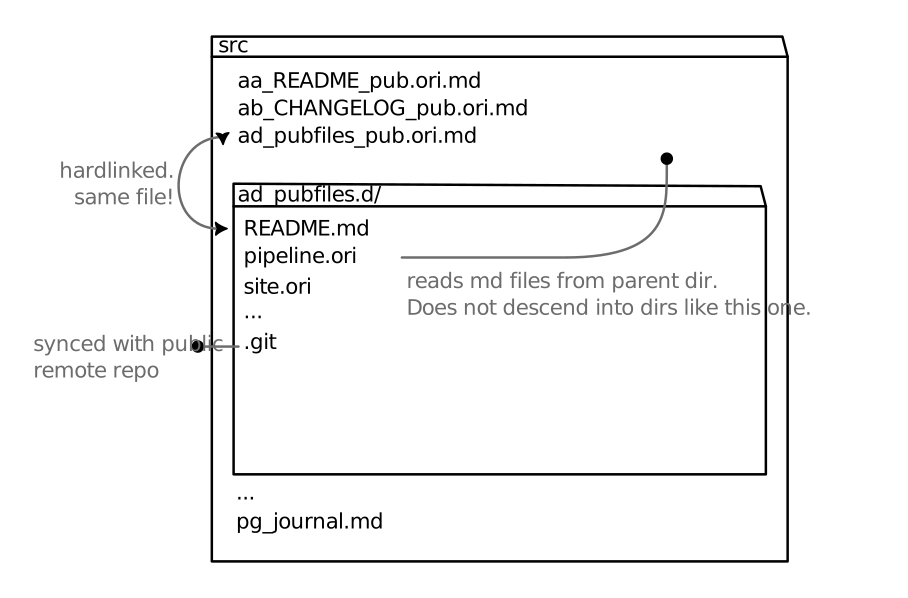
README.mdto the parent directory of this repository, with the namead_pubfiles_pub.ori.md. Now you have input for testing and development, since the ori template files look in the parent directory for files with this pattern. Optionally add more files with the pattern:[a-p]+_title[_pub-other-tags][.ori].md. That is:
- they MUST start with a sequence of characters
a-p, - followed by an underscore,
- followed by a title which does not contain an underscore,
- followed optionally by an underscore and one or more tags separated by hyphens. For testing purposes, only the
pubtag is relevant. - followed by the filetype extension
.md. If you want to use Origami expressions in the file, use.ori.md.
The reason for this setup step is that on my machine, the parent directory contains my personal wiki. So I can’t share the input with you directly. The filename pattern above is used for the process of selecting which files to include in the build. The figure below shows this arrangement.
- Use the following commands to achieve the desired output.
- in private mode:
ori "serve watch ., =debug ./site.ori('all')" - in public mode:
ori "serve watch ., =debug ./site.ori()"
site.ori only exposes the final rendering step from pipeline.ori. Therefore:
- To serve the pipeline with all the processing steps available for inspection, replace
site.oriwithpipeline.oriin the commands above.
Markup Language
I have developed a text markup format which suits my needs better than Markdown. The parser works and I can render HTML with it, but the feature set is still very limited. For example, I can only render single works in italic. That might seem like an odd sort of limitation, but it’s because I’ve started from somewhat different first principles than the assumptions the HTML/Markdown worfklow is based on. As we all know, the last 10% takes the most work. So for now, I’m formatting the source files in Markdown.
Markup-taal
Ik heb een formaat ontwikkeld voor tekst die beter bij mijn doelen past dan Markdown. Het werkt, en ik kan er HTML mee genereren, maar er is nog een heleboel dat het nog niet kan. Omdat de laatste 10% altijd het meeste werk is, gebruik ik voor nu Markdown.
Changes and Updates
This section describes the idea behind the Changelog.
I’ve decoupled changes to the infrastructure from changes to the content of the site. I’ve inserted myself as an editor of the algorithmic file diffs. I review which files have changed between builds of the site, and write a changelog entry explaining what has changed in a way that’s meaningful to readers.
The changelog is the ‘subscription’ mechanism for the site. Instead of a blog section where I write time-bound articles, I write smaller release notes where I draw attention to changes to the ‘evergreen’ pages making up the rest of the site. This way I can notify readers easily of both new content as well as revisions and expansions to existing content. In order to keep track of these changes, I need an easy way of seeing what has changed.
In previous experiments, I put the build output in a separate git repository, then included the output of the git diff command in the changelog in the source repository. It was a laborious and confusing process, confirming to me that git isn’t the best tool for tracking changes to prose the way I write.
I’m concerned primarily with changes to the output of the site. That means I can freely work on drafts as long as those files are not being selected for the final public build by the pub tag.
Web Origami makes it easy to see which files have changed, with the Dev.changes builtin. You pass it the previous build of the site, and the output of the build script, and it reports files modified, added, or removed. What’s nice about this is that you can get a summary of changes without writing the new build to disk. However, the Dev.changes builtin can’t report detailed differences within files. So when composing the changelog entries I do write the new version to disk so I can use a text diffing tool like the graphical meld or the command-line diff for detailed comparisons.
Example
As I’m writing this, The output of the Dev.changes command looks like this:
$ ori 'changes build-26gb-a3/, site.ori()'
  changelog.json: changed
  changelog.rss: changed
  changelog: changed
  index.html: changed
  pubfiles: changed
index.html might be expected to change because it gets summaries of all pages. My index.html really is an index. pubfiles is expected to change — that’s this file. But why have all the changelog files changed, since I haven’t published a new release yet? To see this, I’ll build the site to a new directory, and then inspect a diff of the actual file contents.
$ ori 'copy site.ori(), clear files:build-26gc-a0'

  $ diff build-26gb-a3/changelog/index.html build-26gc-a0/changelog/index.html
  14a15,16
  >   <!--summary-start-->
  >

  17c19
  <   <!--summary-above-->
  ---
  >   <!--summary-end-->
Ah, I changed the format of the comments by which I select summary text for the index. That’s an infrastructural change. I’ll either ignore it, or describe that in a separate section. Further inspection of the diffs shows that I have the following logical changesets to document:
- Added: this section ‘Changes and Updates’
- Infra:
- added highlight-js stylesheet
- started using a pair of comments to delineate page summaries, instead of just
<!--summary-above-->, so that the summary doesn’t have to the be first text in the file.
That will go in the Changelog in this entry How nice and meta is that! Also note that there’s an ‘edit’ in that release note which I hadn’t added when I wrote the above. This could get confusing. I think I need to practise for a bit to find out what the right level of detail is. I was hoping this mechanism would help me release changes on a more deliberate cycle. I guess since the site is brand new there are still little ad-hoc changes to deal with.
Unreleased/In Progress
I realised quite quickly that the binary of released/unreleased is just a bit too strict. It actually increases writer’s block, because it adds another mental filter on top of the writing process: is this idea ready to go public? If not, where do I put it for now, and how do I remember what I’m working on?
I decided to give myself permission to make changes that go public, without documenting them in a Release Note, if I make a note of them in the ‘Unreleased’ section. That may be the one at the top of the Changelog, which is publicly visible, or it may be the one at the bottom, below the <!--private-below-->line, which gets stripped out of the public build. I guess you should think of the website as a construction project. Before the official opening, the interior work is largely invisible, but most of the exterior work is visible to passers-by. My commitment is to document these changes with a Release Note sooner than later. This affordance is not for all ideas and drafts — that’s what the private version of the site is for — but for when the work-in-progress is entangled with the published work and it’s simpler to edit it in place. And, I must admit … it’s also because I enjoy the mischievous feeling of breaking my own rules and spreading a bit of ambiguity.
The Unreleased/In Progress list also gives readers an idea of what I’m working on now.
Future Work
What I want to do is create separate sub-feeds for additions, major revisions, minor edits, and infrastructural changes:
- additions: significant new content added, like new files or a whole new section (like this one)
- major revisions: changes to existing content which alters the meaning of what is written
- minor edits: fixing typos or turns of phrase.
- infrastructure: alterations to the look or behavior of the site as a result of changes to the code.
I’m pretty sure I’ll be able to parse the changelog.md file further to create new feeds with only the relevant subheadings for each changelog entry. This way, people can subscribe to new content and major revisions without being bothered by minor edits.
I suppose I should include, The templates now include which ‘infrastructure’ version was used to build the site, identified by a commit hash.
I also want to try serving the history of the site. The ingredients that are playing around in my head:
rsync versionY --link-dest=versionX server:/versionYwill hard link unchanged files to the previous build directory when copying to the server. This means many versions can be stored with greatly reduced disk space.- the web server would map
/to a directorylatestwhich is a symlink to the latest build. Other builds are available under a version prefixed path, e.g.https://hansfast.net/v26cg-a0/pubfiles. - a wrapper script would take care of creating the new version directories and updating which one
latestpoints to. - the ori templates would add links to the next and previous versions of the current file.
- should the next/prev links be baked into each build, or should the server keep a list and resolve generic
/next,/prevrequests based on a query parameter for the current version? - since the files are hard linked, the system can’t actually show whether a file has changed from one version to the next. This might be a great place for an htmx request and a client-side diffing script.
Source files
The scripts and templates used to build this site are available here.